Why Touch Panel Switches Are Trending in Smart Office Automation
Modern offices are moving beyond conventional electrical switches toward connected, convenient, and more flexible control systems. A touch panel switch board combines the familiar function of switching lights and appliances with a cleaner interface and, depending on the system, smart automation features.
The growing interest in smart offices is also connected to energy management. According to the Bureau of Energy Efficiency (BEE), buildings account for almost 35% of total energy consumption in India, with demand growing by nearly 8% every year, making lighting control an increasingly relevant part of commercial energy planning. Dimmers, motion sensors, and occupancy-based controls are commonly recommended approaches to reducing unnecessary lighting use, though actual savings depend on the space, usage pattern, and how the system is configured.
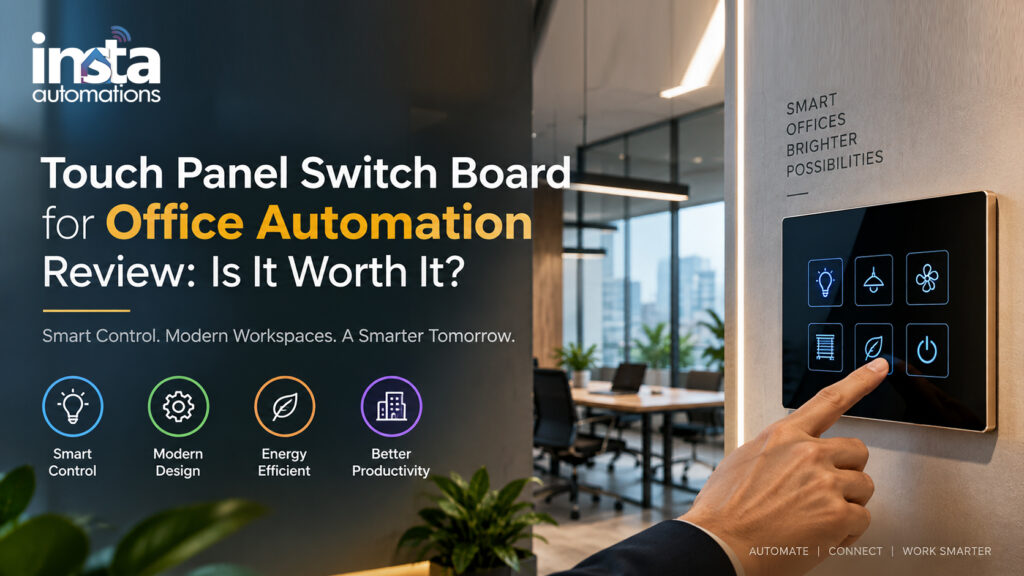
What is a touch panel switch board for office automation?
It uses a touch-sensitive interface to control lights and compatible electrical loads, with smart models supporting automation features.
For businesses considering an automation touch switch board, however, appearance alone should not determine the purchase. Installation requirements, compatibility, functionality, reliability, maintenance, and the overall return on investment should also be considered.
Touch Panel Switch Board for Office Automation: Features, Benefits & Cost
1. What Is a Touch Panel Switch Board for Office Automation?
A touch panel switch board replaces conventional mechanical switches with a touch-sensitive interface. Instead of physically pressing a toggle, users tap a designated area to operate connected lights or other compatible loads.
Depending on the model and automation ecosystem, an automation switch panel may provide:
- Touch-based ON/OFF control
- Multiple lighting-zone control
- Dimming support
- Scene or preset control
- Remote control through an app
- Integration with sensors
- Scheduling and automation
- Voice-assistant compatibility
- Centralized control of multiple devices
It is important to distinguish a basic touch switch from a complete smart-office automation system. A touch panel can provide modern control, but advanced automation generally requires compatible controllers, communication systems, sensors, software, or gateways.
For customers searching for a touch switch board home or smart switch board home, many of the same technologies can also be adapted to residential applications, although office requirements are usually more demanding.
2. Smart Office Lighting Control With Touch Panel Switches
Lighting is one of the most practical areas for office automation. A touch panel can allow employees to control different lighting zones from one location rather than operating numerous individual switches.
Can touch panel switches control office lighting?
Yes. They can control multiple lighting zones and support features such as dimming, scenes, scheduling, and sensors.
A properly designed system can also work with occupancy and daylight controls. ENERGY STAR recommends occupancy sensors for spaces such as meeting rooms and low-traffic areas, while the Department of Energy highlights advanced lighting controls as an opportunity for energy savings.
For example, an office could create scenes such as:
- Work Mode: Main lights ON
- Meeting Mode: Selected lights ON with reduced brightness
- Presentation Mode: Front lighting OFF and presentation-area lighting adjusted
- Break Mode: Selected zones OFF
- After-Hours Mode: Non-essential lighting switched OFF
Research published in Energy and Buildings also found significant energy-saving potential from combining occupancy detection and daylight harvesting in office lighting systems. However, those results relate to a specific sensor-controlled system rather than touch switches alone, so they should not be treated as a guaranteed saving from installing a touch panel.
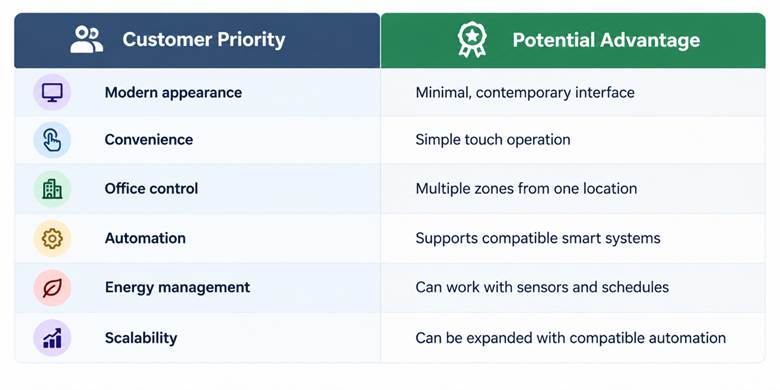
3. Key Benefits of Touch Panel Switches for Modern Offices
A touch panel can offer benefits beyond aesthetics.
Cleaner Office Design
Flat glass or touchscreen-style panels can provide a modern appearance and reduce the visual clutter associated with multiple traditional switches.
Easier Zone Control
Several lighting circuits can potentially be grouped into one panel, making it easier to control different areas.
Better Automation Potential
When connected to an appropriate automation platform, the panel can become part of a wider smart-office system.
Flexible User Experience
Different scenes, schedules, sensors, and control methods can be configured depending on the system.
Potential Energy Management
The switch itself does not automatically guarantee energy savings. Savings depend on the connected loads and how automation is configured. ENERGY STAR specifically identifies occupancy-based lighting control as one method for reducing lighting costs.
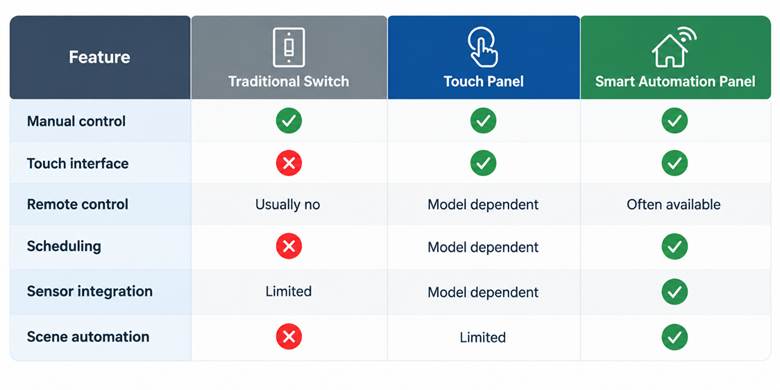
4. Touch Panel Switches vs. Traditional Switch Boards: What’s the Difference?
Traditional switches remain straightforward, familiar, and generally easy to operate. Touch panels add a digital interface and may provide additional automation capabilities.
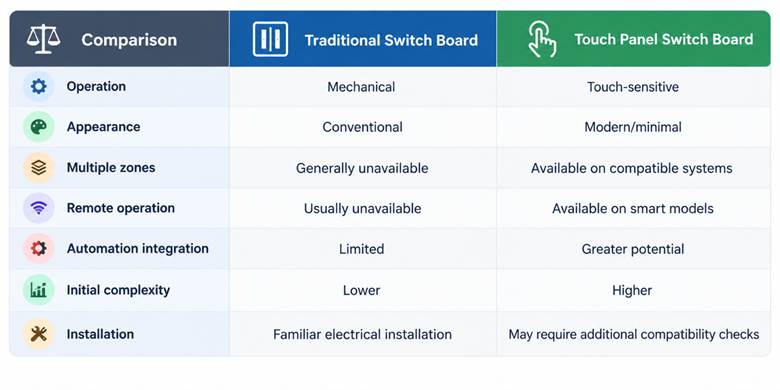
For an office, the right choice depends on the desired functionality. If the requirement is simply turning lights ON and OFF, a conventional switch may be sufficient. If the goal is centralized control and integration with a wider automation system, a touch panel can provide additional possibilities.
Do touch panel switches reduce office electricity consumption?
Not automatically. Savings depend on system design, with occupancy sensors, scheduling, and daylight control helping reduce unnecessary lighting use.
Safety and compatibility should also be verified before installation. BIS maintains standards covering electrical equipment and electronic switches, and its published material references requirements for electronic switches and electrical installations.
5. How Much Does Smart Office Automation With Touch Switches Cost?
There is no single reliable price for a complete office automation installation. Cost depends on the number of switch points, circuits, room size, wiring condition, product specifications, automation protocol, controller requirements, sensors, installation complexity, and whether existing infrastructure needs modification.
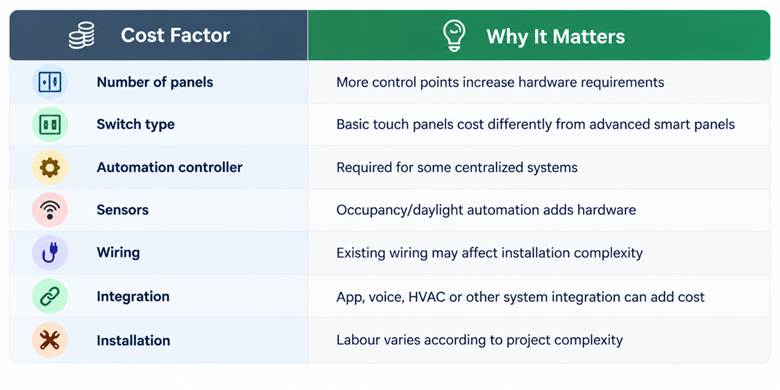
Instead of comparing only the price of a switch, customers should calculate the total installed cost and compare it with the convenience, functionality, energy-management opportunities, and expected service life.
For a professional office project, Insta Automations can assess the space, understand the required automation functions, and recommend a solution based on actual requirements rather than simply selecting switches based on appearance.
Conclusion
Are Touch Panel Switches Worth It for Office Automation?
A touch panel switch board can be worthwhile for an office when the objective goes beyond basic ON/OFF switching. Its value comes from combining modern control with the possibility of lighting scenes, centralized operation, scheduling, sensors, and wider smart-office integration.
However, customers should not assume that every touch panel automatically delivers energy savings or complete automation. The final result depends on product quality, electrical compatibility, system design, installation, and configuration.
For businesses planning a smart workspace, the best approach is to evaluate the complete automation requirement—including lighting, sensors, control, scalability, and maintenance—before selecting an automation touch switch board.
Looking to upgrade your office with smart control? Contact Insta Automations to discuss a customized office automation solution designed around your space and requirements.
FAQs
What is a touch panel switch board?
A touch panel switch board uses a touch-sensitive interface to control connected lights or electrical loads. Smart versions can also support automation features such as scenes, scheduling, apps, and sensors.
Can a touch switch board be used for home automation?
Yes. Depending on compatibility, touch switches can be used in residential automation. Products designed for a touch switch board for home can control lighting and other compatible devices.
Does a smart switch board automatically reduce electricity consumption?
Not necessarily. Energy savings depend on how the system is designed and used. Automation features such as occupancy sensing, scheduling, and daylight control can help reduce unnecessary lighting use.
Is an automation switch panel better than a traditional switch?
They serve different requirements. A traditional switch is suitable for basic manual control, while an automation switch panel can provide additional control and integration capabilities. The appropriate choice depends on the office’s automation requirements.
How do I choose a touch panel switch board for my office?
Consider electrical compatibility, number of circuits, automation protocol, required sensors, app or remote-control features, installation requirements, product support, and future expansion before purchasing. Always use qualified professionals for electrical installation.